Refund an event booking
Refund everyone or one person, back to the card or by another method, and release their places in the same step.
Updated 18 October 2026Managers and owners onlyDepends on your plan
Managers and owners can refund money on an event booking. The refund window opens in a few ways:
- Refund… in the Payments & refunds panel, or Refund on a single payment.
- Refund… in the violet Refund to review box on a booking.
- Automatically, right after you cancel a booking that has money paid.
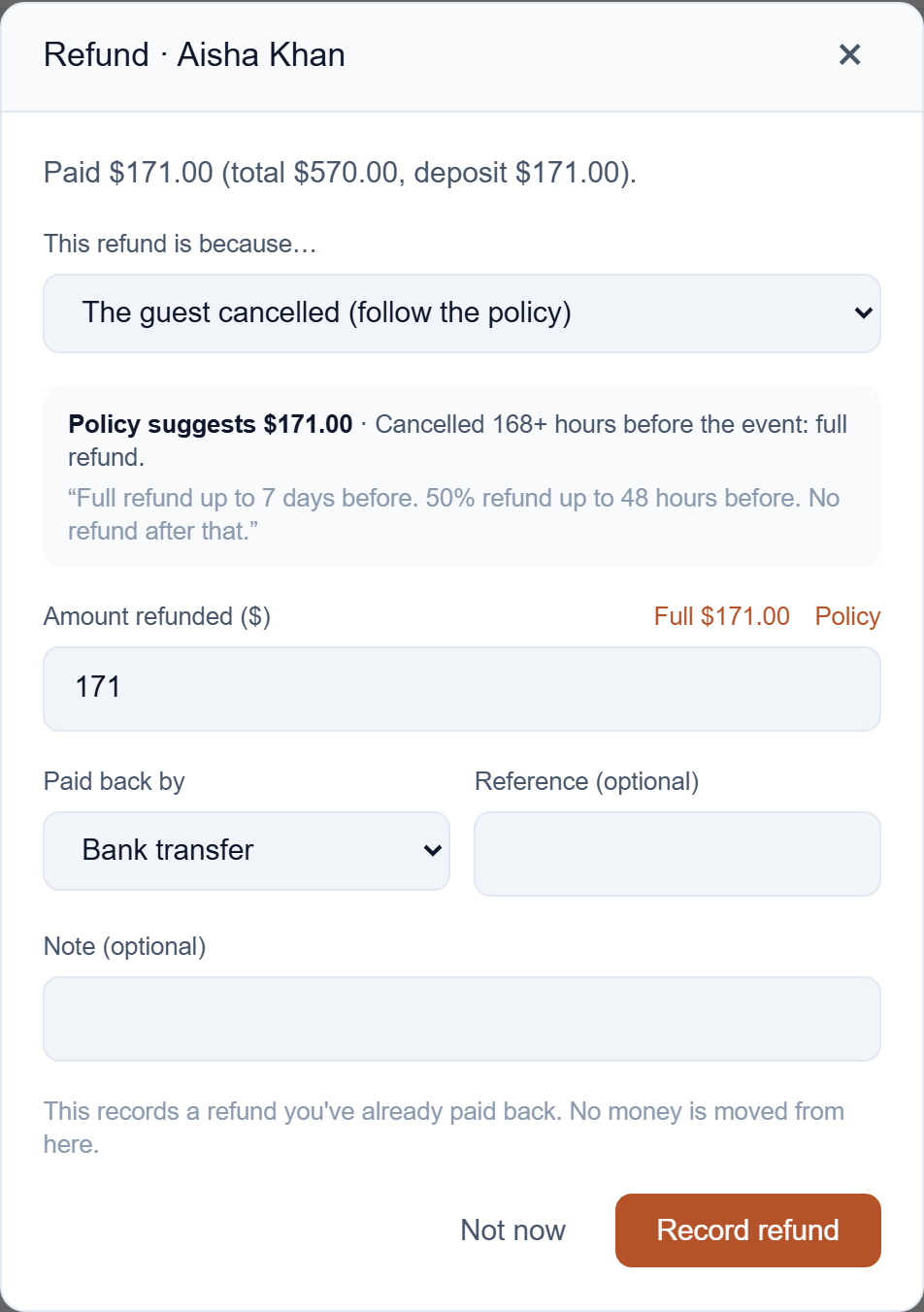 The Refund window
Step by step
- Refund to: choose Everyone who paid (newest payment first) or a single person. A single person shows how much they have available and how many places they paid for.
- This refund is because: choose The guest cancelled (follow the policy) or The venue cancelled (full refund).
- Read the grey box. It says what the policy suggests, for example "Policy suggests $142.50. Inside the refund window: 50% refunded, deposit kept", and quotes the policy text.
- Check the Amount refunded. It starts at the suggestion, but you can change it. Full and Policy shortcuts put either amount in for you.
- Choose Paid back by:
- Back to their card (Stripe) sends the money back to the card it came from.
- Bank transfer, Cash, Card (reversed) or Other records a refund you have already paid another way.
- Press Refund to card or Record refund.
Note: Record refund only writes it down. No money moves from TableSoul. Refund to card really sends money from your Stripe account back to the guest's card.
One person drops out
For a group where one friend can't come:
- Under Refund to, pick that person.
- Tick Also release their places. The booking drops to the smaller number of places, the total comes down, the places go back on sale, and the guest is emailed.
- Press Refund to card.
A refund to one person always goes back to their own card only. You can't release every place this way. Cancel the booking instead.
Checks that keep you safe
- The amount must be more than $0 and no more than the money still in hand. If it's too high you'll see "Only $120 is available to refund" and the button is disabled.
- If a Stripe refund only partly goes through, you'll be told how much is left so you can record the rest another way.
- Refunds made inside your Stripe dashboard are copied back into TableSoul automatically ("Refunded through Stripe").
Refund to review
A cancelled booking with money paid can show a violet Refund to review tag, or Refund requested if the guest asked for an exception. The box shows what the guest wrote and offers:
- Refund… to deal with it.
- No refund due, dismiss if nothing is owed.
Any refund clears the tag. Cancelled bookings that still need attention stay in the list even when Show cancelled is off, and the events list shows "2 need attention".
See Cancellation policy and automatic refunds to understand when a booking gets this tag.
Did this answer your question?