Approve or decline pending bookings
Review booking requests that need your approval, pick a table and confirm them or turn them down.
Updated 18 October 2026
Some services need you to approve bookings before they are confirmed, such as a private function. Requests for those services wait on the Pending page. The menu item shows a number when something is waiting.
How bookings become pending
- A guest requests a time on a service with Auto-approve turned off. They're told "Your request has been received and is awaiting confirmation."
- Staff choose Pending approval as the status when creating a booking.
You can turn auto-approve on or off for each service. See Set up your services.
Review a request
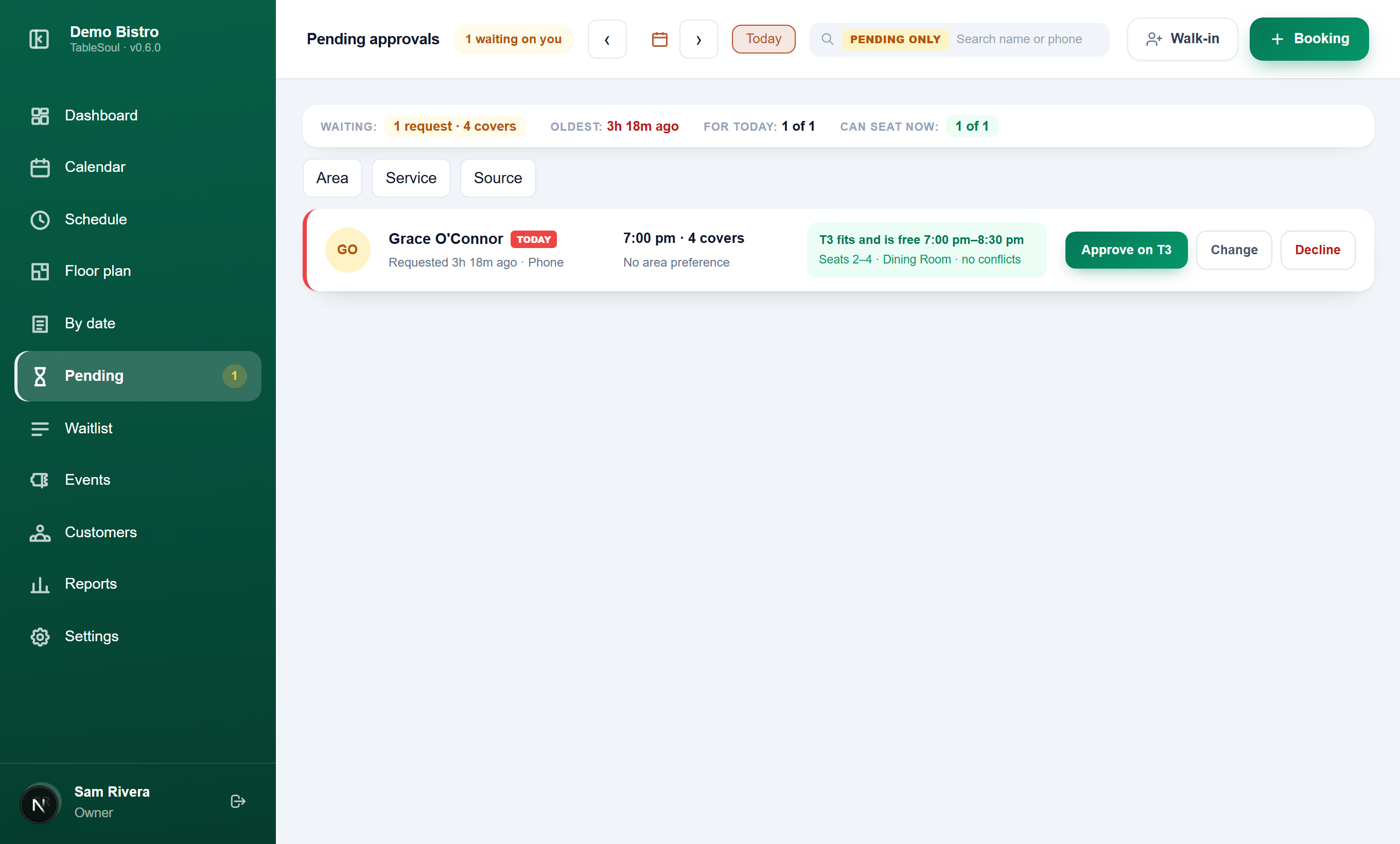 The Pending page
Each card shows the guest, when they asked, the time, number of covers, and whether they have a preferred area. A small badge may say TODAY, LARGE PARTY (8 or more) or RETURNING.
A coloured panel suggests a table:
- Green: "T3 fits and is free 19:00 to 20:30. No conflicts."
- Amber: the suggested table is outside the guest's preferred area.
- Red: "No table fits and is free right now. Review manually."
The bar at the top summarises the queue: how many are waiting, the oldest, how many are for today, and how many you can seat now.
Approve or decline
- Approve on T3 confirms the booking straight away on the suggested table. The guest is emailed and texted.
- Change (or Review when no table is suggested) opens the booking so you can pick a different table or edit details. There, Approve stays greyed out until a table is chosen.
- Decline turns the request down and emails the guest. It asks no confirmation, so be sure first.
If you want to adjust the booking without deciding yet, use Save changes without deciding yet.
Good to know
- Approving checks that the table isn't held for an event, but it doesn't stop you choosing a table with another booking at that time. You are trusted to choose well.
- A declined booking can't be changed afterwards.
- Filters at the top let you narrow by date, area, service and source, and search by name, phone or email.
Did this answer your question?