Manage the attendee list and export it
What every badge and button on an event booking means, how to mark guests attended, and how to export a CSV.
Updated 20 October 2026Depends on your plan
Open an event to see its Attendees, one card per booking.
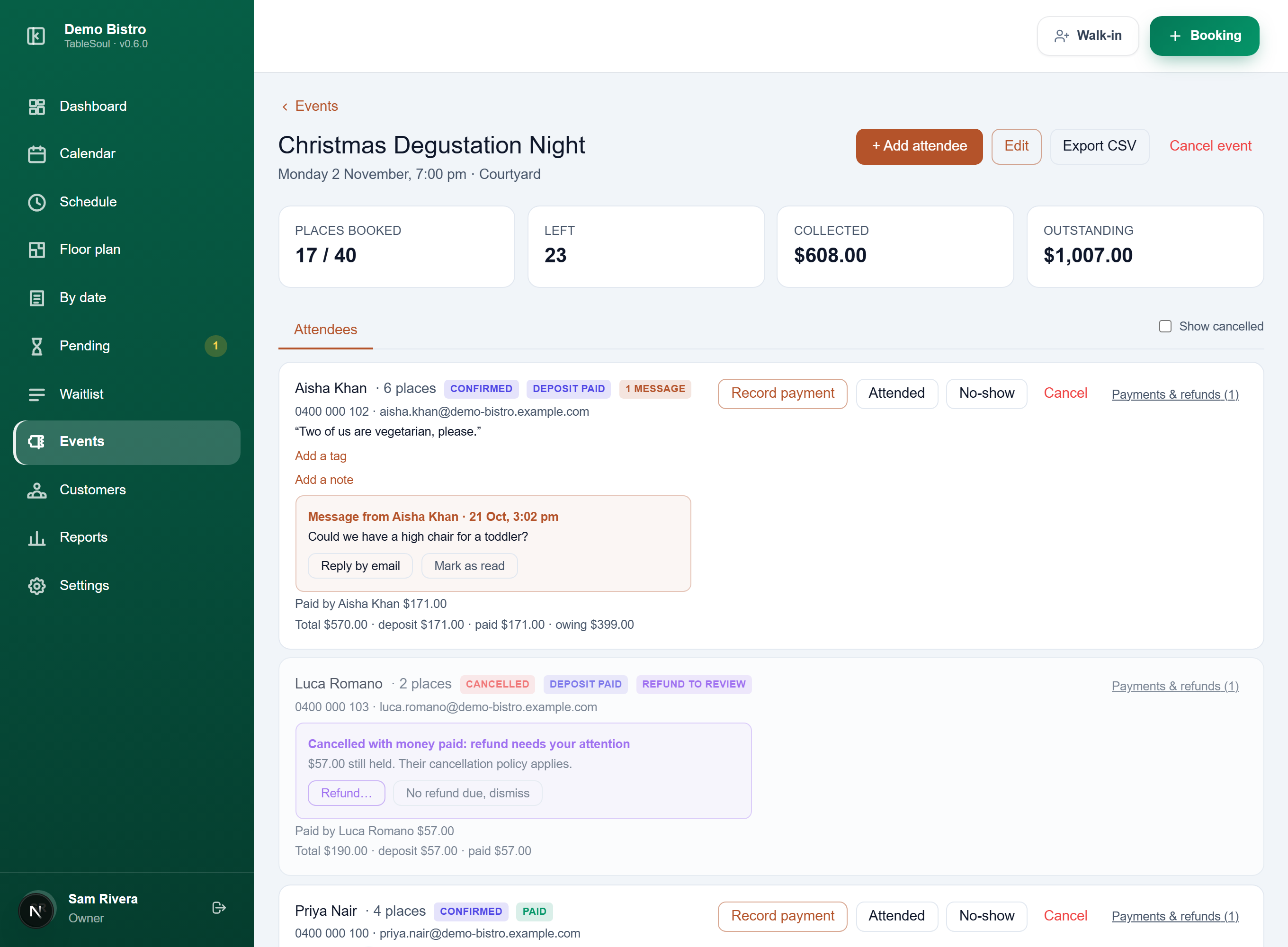 An event's attendee list
The list
- Bookings appear oldest first.
- Cancelled bookings are hidden unless you tick Show cancelled. The exception: a cancelled booking that needs attention (a refund to review, or an unread message from the guest) always shows, and it is sorted to the top.
- There's no search box or filter on this list. For a long list, use your browser's find (Ctrl+F).
What each card shows
- Name, number of places, and a status badge: Confirmed, Attended, No-show, Cancelled, or Awaiting payment (an online booking still being paid for).
- On paid events, a payment badge: Unpaid, Partially paid, Deposit paid, Paid, Partially refunded or Refunded.
- Returning for guests with more than one visit, their tags, Known for tags, and the seating area and tables.
- Their message, your staff notes, the last few changes ("Places 4 to 3, edited by Sam, 18 Oct 3:41 pm, guest emailed"), who paid what, and the money line: total, deposit, paid, owing.
- Violet Refund to review or Refund requested tags, and gold message tags.
Click the card to open Edit booking. See Edit an event booking and tell the guest.
Buttons on a card
| Button | When it appears |
|---|---|
| Assign tables / Change tables | The event holds tables. |
| Request payments | The event takes card payments and money is still owing. |
| Record payment | Paid events, for bookings that aren't cancelled. |
| Attended and No-show | Confirmed bookings. |
| Undo | After Attended or No-show, to go back to Confirmed. |
| Cancel | Any booking that isn't already cancelled or attended. You're asked to confirm, and told they'll be emailed. |
| Payments & refunds | Bookings that have payments. |
Which status changes are allowed
- Confirmed can become Attended, No-show or Cancelled.
- Awaiting payment can only be cancelled.
- Attended and No-show can switch between themselves or go back to Confirmed.
- Cancelled is final. To bring someone back, add them again as a new booking, which checks capacity.
Event buttons at the top
- + Add attendee (all staff). See Add an attendee to an event.
- Edit and Cancel event (managers and owners).
- Export CSV (managers and owners).
Export to a spreadsheet
Export CSV downloads event-name-attendees.csv.
Columns: Name, Email, Phone, Places, Status, Total, Paid, Refunded, Payment status, Guest message, Staff notes, Booked at.
- It includes every booking, including cancelled ones.
- Money is in dollars. Status shows as codes such as CONFIRMED or NO_SHOW.
- Booked at is in UTC.
- Tables and tags aren't included.
- It opens in Excel with accents intact.
Did this answer your question?