Get a daily summary email each morning
Email the venue's owners a short summary of the day ahead and how yesterday went, and choose when it goes.
Updated 21 October 2026Managers and owners only
The daily summary is a short email each morning, so the owners know what the day looks like before they open the dashboard. It is off until you turn it on.
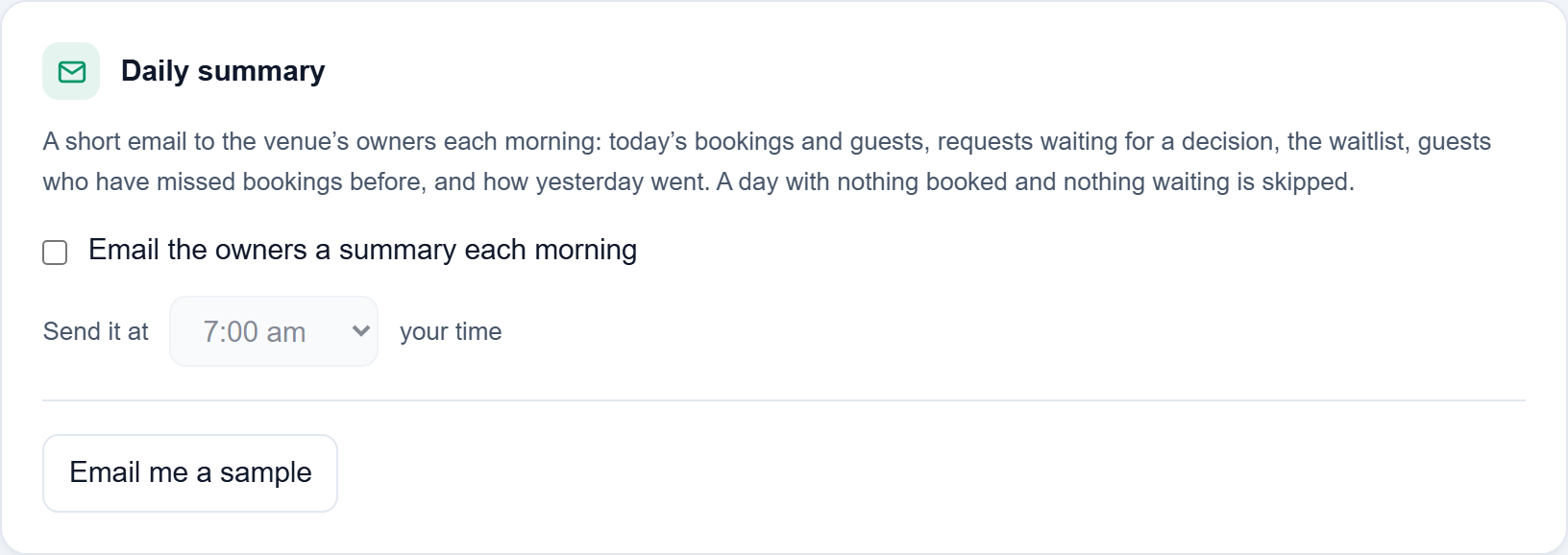 The Daily summary card in Settings
Turn it on
- Go to Settings > Taking bookings.
- Find Daily summary.
- Tick Email the owners a summary each morning.
- Choose the time, from 4:00 am to 12:00 pm. It is your venue's own time, whatever time zone the server is in.
- Save.
Press Email me a sample first if you want to see it. The sample goes only to your own email address, shows today as it stands right now, and works even before the summary is turned on.
What's in it
- Today: confirmed bookings and the number of guests.
- Needs your decision: requests still waiting to be approved or declined, and how many are for today.
- Waiting on a deposit: tables being held until a deposit is paid.
- Waitlist: how many guests are waiting.
- Yesterday: guests served, no-shows and cancellations.
- Worth a quick call or text: today's guests who have missed bookings before, with the time and party size, so you can phone ahead or ask for a deposit. See Spot guests who have no-showed before.
Lines with nothing to say are left out. The Open today's dashboard button goes straight to the dashboard.
Who gets it
Every owner of the venue who has accepted their invite and is not deactivated. Managers and floor staff don't get it. If a venue has no owner who can sign in, nothing is sent.
When it is sent
- Once a day, at the time you chose. It is checked every 5 minutes, so it can arrive a few minutes late.
- A day with nothing booked, nothing waiting and nothing from yesterday (a closed day, say) is skipped.
- If the system was down at the chosen time, the summary still goes out later that morning, but not after about five hours past the time you chose.
- If sending fails, it is tried again on the next check.
Good to know
- Want a look back at the end of the day instead? See Get an end-of-day report.
- You can't reword this email, and it doesn't change with your email branding beyond your logo and colour.
- For a group of venues, each venue has its own summary. Use Copy settings between venues to turn it on everywhere.
- It doesn't appear in Settings > Sent messages, which lists guest emails and texts. If it doesn't arrive, check the owner's spam folder and that the owner has accepted their invite, then see A guest didn't get their email or text for the usual email problems.
Did this answer your question?