The Dashboard in detail
What each tile, chart and list on the Dashboard shows, and what the Advanced view adds for managers.
Updated 24 October 2026
The Dashboard is your home page. It updates as the day goes on.
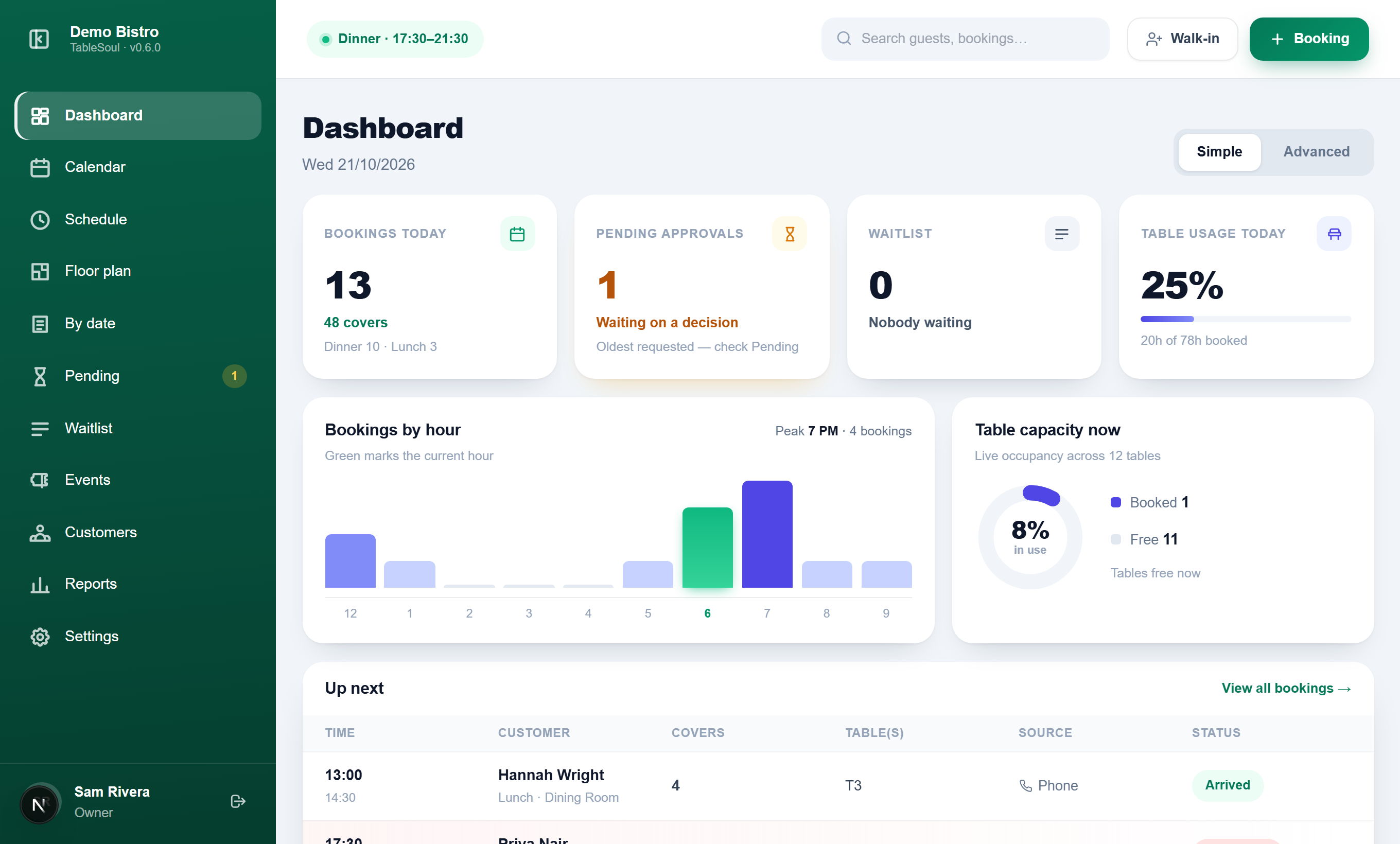 The Dashboard
The top bar
- A pill showing the service running now with its hours, for example Dinner 17:30-21:30, or No service running now.
- A search box for today's bookings and for customers (by name, phone or email). Clicking a booking opens it; clicking a guest opens their profile.
- Walk-in and + Booking buttons.
The tiles
| Tile | Shows |
|---|---|
| Bookings today | Bookings today, excluding cancelled and declined, with covers and a split by service. |
| Pending approvals | Requests waiting for you. Click to open Pending. |
| Waitlist | Guests waiting (only if your plan has the waitlist). |
| Table usage today | The share of table-hours booked, such as "15h of 78h booked". |
The charts
- Bookings by hour: a bar for each hour. The current hour is green.
- Table capacity now: how many tables are in use right now and how many are free.
Up next
A list of the next bookings (up to 8 that are pending, confirmed or arrived) with their time, guest, covers, table, source and status. A red 12m late appears for a confirmed guest who is past their time. View all bookings opens By date.
Simple and Advanced
Managers and owners can switch between Simple and Advanced at the top. The choice is remembered on that device. Staff always see Simple.
Advanced adds:
- A Needs attention banner with a Review link.
- Today by service.
- vs same day last week: bookings, covers and no-shows.
- Today at a glance: the peak hour, largest party and average party size.
- Next 7 days: confirmed bookings already on the books from tomorrow (a count of what's booked, not a forecast). It links to By date.
The setup checklist
A new venue also sees Finish setting up at the top until four steps are done: Finish setting up your venue.
Related
Find bookings, Start-of-shift checklist, Understand your reports.
Did this answer your question?